Alight Motion serves as a powerhouse for mobile creators looking to bridge the gap between simple video editing and professional motion design. This versatile tool brings sophisticated visual effects and keyframe animation directly to your smartphone, allowing for high-quality production on the go. Whether you are a social media influencer or a hobbyist, it provides the necessary depth to transform raw footage into cinematic masterpieces without needing a desktop setup.

Alight Motion
Alight Motion
Download
131.96 MB
Alight Motion Screenshots
1 / 8
131.96 MB
Size
5.0.273.1028417
Version
6.0+
Android
Universal
Arch
About Alight Motion
Alight Motion serves as a powerhouse for mobile creators looking to bridge the gap between simple video editing and professional motion design. This versatile tool brings sophisticated visual effects and keyframe animation directly to your smartphone, allowing for high-quality production on the go. Whether you are a social media influencer or a hobbyist, it provides the necessary depth to transform raw footage into cinematic masterpieces without needing a desktop setup.
Professional Motion Graphics
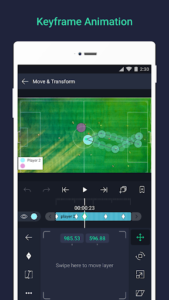
Creating fluid animations requires a deep level of control over every movement on the screen. This platform offers a comprehensive keyframe system that allows users to define specific points of action for any object or layer. You can adjust timing, curves, and easing to ensure that transitions look natural rather than robotic. By mastering these controls, creators can build complex sequences that rival those made on high-end PC software.
Advanced Visual Effects
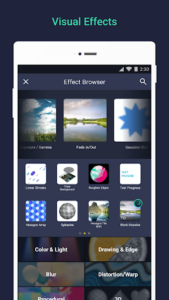
Visual storytelling often requires more than just simple cuts and transitions between clips. This solution provides a massive library of over a hundred customizable effects, ranging from color correction and blurs to stylized distortions and shadows. Users can stack multiple layers of effects to achieve a unique aesthetic, giving every project a distinct personality. The ability to fine-tune every parameter ensures that your creative vision is never limited by pre-set filters.
Multi-Layered Editing Workspace
Managing complex projects is significantly easier when you have a structured environment to work in. This tool supports multiple layers of graphics, video, and audio, allowing for intricate compositions where elements can overlap and interact. You can group these layers together to apply collective changes or mask specific areas for advanced compositing. This hierarchical approach is essential for anyone serious about producing detailed and professional-looking video content.
Vector and Bitmap Support
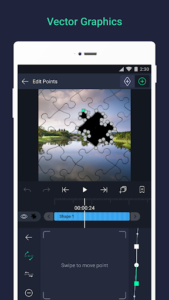
Flexibility in asset management is a standout feature of Alight Motion, as it handles both vector and bitmap images with ease. You can import your own illustrations or use the built-in vector tools to draw shapes directly within the interface. Since vector graphics are resolution-independent, they remain crisp and sharp no matter how much you scale or animate them. This is particularly useful for designing logos or text elements that need to maintain high quality.
Precise Color Correction
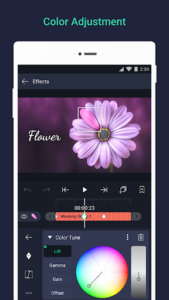
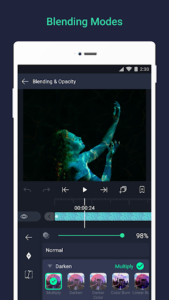
Achieving the right mood for a video often depends on the color grading and lighting adjustments applied during post-production. This experience includes professional-grade color adjustment tools that let you manipulate hue, saturation, and brightness with extreme precision. You can also utilize gradient fills and blending modes to create atmospheric depth and professional-looking overlays. These features empower users to give their videos a polished, cinematic look that stands out in any feed.
Flexible Export Options
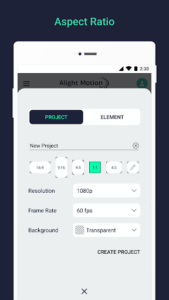
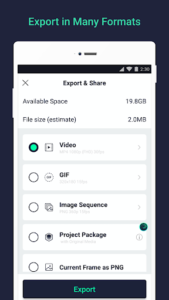
Once the creative process is finished, sharing your work in the right format is crucial for reaching your audience effectively. The service allows for exporting projects as MP4 videos, animated GIFs, or even PNG sequences for further editing elsewhere. You can choose from various resolutions and frame rates to optimize the file size and quality for specific social media platforms. This ensures that your final output looks exactly as intended, whether it is viewed on a mobile screen or a monitor.
Frequently Asked Questions
The basic features of Alight Motion are available for free, though some premium tools and effects require a subscription. The free version typically includes a watermark on exported videos.
Yes, the interface is fully optimized for both smartphones and tablets, offering more screen real estate for complex editing tasks. Using a stylus on a tablet can further enhance the precision of your animations.
To remove the watermark from your projects, you need to purchase a premium membership within the application. This subscription also unlocks the full library of advanced effects and sharing features.
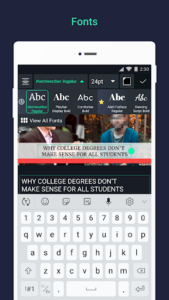
Users can import their own font files to ensure their text overlays match their specific branding or style. This feature provides even more creative freedom when designing titles and captions for your videos.
Additional APP Information
Package Name
com.alightcreative.motion
Developer
Alight Motion
Category
Updated
Mar 6, 2026
Content Rating
Everyone
Signature
eca6bf91b8715a6f810ed0bbfc65b6cd578f52a8
Get it On

You are now ready to download Alight Motion for free. Here are some notes:
- Please read our APK Info and installation instructions carefully for the game & app to work properly
- Read the FAQ carefully for more details
4.5/5 (123 votes)